

Everything Lanturne does
This is the long version: what Lanturne does today, on the watch, on your phone and on our servers. Nothing here is a plan for later.
Some of it depends on things we do not control, which is the watch, its permissions, its battery and the network it is on. Where that is true it is said here rather than left out, and the last section is a plain list of what Lanturne is not.
If you would rather have the short version, the home page covers it in a minute.
The five things that set off your phone
Something happened
- The HELP buttonPushed and held on the wrist.
- A fallThe watch's own detector, not ours.
Nothing happened
- A missed check-inThe morning tap never came.
- A silent watchNo report for longer than you chose.
- Worn, with no pulseOn the wrist, no heartbeat, no movement.
Your phone alerts you.
The bottom three are the ones a pendant cannot do, because nobody pressed anything. That is the whole of the difference.
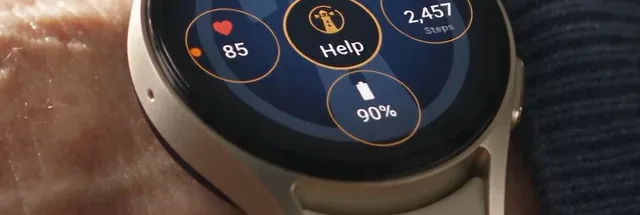
- The HELP button. The wearer pushes and holds it, and after a short countdown your phone goes off.
- A fall. The watch's own fall detector does the noticing and Lanturne passes it on. If the wearer does not wave it off, your phone alerts you. It needs the physical activity permission left on, and the watch settings page says how to check.
- A missed check-in. The watch asks once each morning at a time you choose. If the tap does not come, your phone alerts you after a wait you set.
- A silent watch. If the watch stops reporting for longer than you chose, your phone alerts you. It may only be flat or out of range, and you would still want to know.
- Worn, with no pulse. If the watch is on the wrist, finds no heartbeat and sees no movement for as long as you chose, your phone alerts you. Nobody has to press anything for this one.
The HELP button

- 0 secondsPress and holdA ring fills and the watch buzzes.
- Let go earlyThe ring empties. Nothing is sent.
- 3 secondsFive seconds to change their mindA countdown, with Cancel.
- CancelSpoken and shown. Nothing is sent.
- 8 secondsSentA pulse from the moment of the press goes with it, and a position if the watch's location is on.
- 28 secondsThe button comes backReady to be pressed again.
The countdown belongs to the app, not the screen. If the watch restarts in the middle of it, the alert still goes out when it comes back.
- It sits on the watch app's home screen, with the wearer's name above it, and it sinks under the finger as it is pressed.
- Hold it for three seconds. A ring fills as the watch buzzes, so it says "not yet" until it says "sent".
- Five seconds to change their mind. A countdown with a Cancel button. Canceling is spoken and shown: "You canceled. No help needed."
- The countdown belongs to the app, not the screen. If the watch restarts mid-countdown the alert still goes out when it comes back.
- "We have contacted your Lanturne" is shown and spoken once it is sent, and the button returns after twenty seconds. The watch does not say help is coming, because nothing is dispatched automatically.
- A pulse goes with it, read at the moment of the press.
- A position goes with it when the watch's location is switched on: a fresh fix if one arrives in time, otherwise the last known one, with its age.
- It reaches us with no phone involved over the watch's own mobile plan or Wi-Fi.
- It can be reached three ways: the app, the watch face's Help button, and the tile.
The daily check-in
- The time you setThe watch asksIt buzzes, asks out loud, and shows an “I'm OK” button. 7:00 AM to 11:00 AM, your choice.
- If it is tappedOne tap answers it“Checked in at 8:02”, for the rest of the day. Nothing else happens.
- If it is notThe grace period you setFive minutes to four hours, so a slow morning does not wake you.
Your phone alerts you.
Wear OS decides whether that card is put in front of the wearer, and it does not always show it. The buzz and the spoken question still arrive, and the wearer answers by opening Lanturne on the watch. That is why the wait is yours to set, and why we would not set it to five minutes.
- At a time you choose, between 7:00 AM and 11:00 AM. The watch buzzes and asks out loud, and shows a card with an "I'm OK" button.
- One tap answers it. The watch then reads "Checked in at 8:02" for the rest of the day.
- A restart does not cancel the ask. A prompt still waiting survives the watch restarting.
- You set the grace period, from five minutes to four hours, so a shower or a slow morning does not wake you.
What the watch keeps an eye on
- Whether it is being worn, from skin contact and the pulse together. A measured pulse outranks a sensor that says otherwise.
- The pulse, taken about every fifteen minutes when the watch can read one.
- Steps, from the watch's own daily total.
- The battery, with a low-battery note to your phone once per discharge at 25%, clearing at 50%.
- Its own settings. Thirteen things that have to stay switched on, each reported to your phone and shown only when one is wrong.
- Where it last reported from, kept as a single value that each new one replaces.
On the wrist
- It speaks. Pairing, the check-in and every SOS state are read out loud, so nobody has to squint at the screen.
- It buzzes differently for the hold, the confirmation and the cancel.
- It looks like the phone app, same palette, same honeycomb, same typefaces.
- There is no settings screen to get lost in. Permissions are asked once, at setup. Everything about the watch's condition goes to your phone instead.
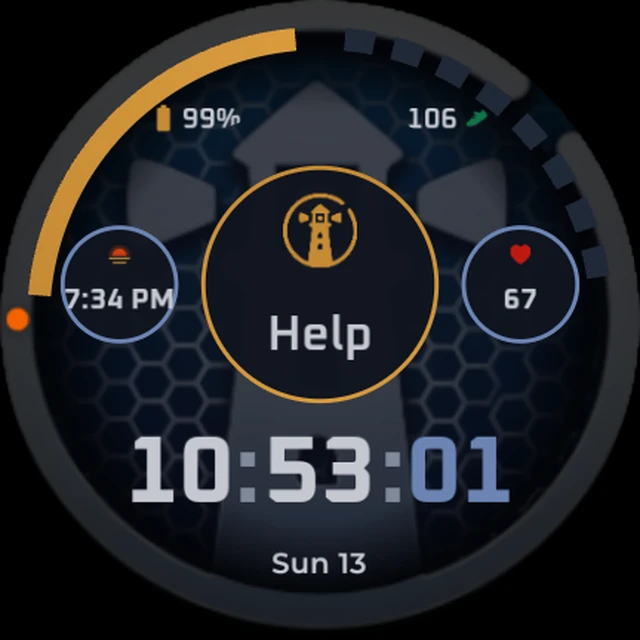
- An optional watch face puts a Help button in the middle of the dial, with four complications you can set to whatever you like.
Pairing
- A six-digit code shown on the watch and read out loud, good for fifteen minutes. You type it into your phone. If it runs out, the watch shows a new one on its own.
- The wearer never needs an account or a password.
- Your phone and the watch never have to be near each other, then or afterwards. The wearer can read you the code over the telephone.
- The watch keeps its own identity in the watch's secure hardware.
- Unpairing on the wrist: five taps on the name at the top of the dial, then a two-second hold on Unpair. You get an alert saying it happened.
- Pairing a new watch retires the old one.
Never losing an event
- The watch stores what happened when it cannot reach us, up to two hundred events, encrypted on the watch.
- It sends them as soon as it is back online, so a press during a dead spot reaches you late rather than not at all.
- It tells the wearer out loud that it has lost its signal.
- An emergency is never dropped to make room. Ordinary events are discarded first.
- A resent event is never duplicated.
What you see on your phone
- The answer first, in words. Either what needs you, or "Nothing needed your attention. The watch last reported 2 min ago."
- Six tiles: last check-in, watch battery, wrist, last seen, check-in time, last pulse.
- The wrist tile reads On, Off or Not known, and Off is shown in red.
- A card when something on the watch needs attention, in plain words, with what to do about it.
- A card when your own phone cannot sound an alert, with a link straight to the setting.
- The past six days as a small scorecard.
- Recent events, grouped by how much they matter, with a way to see them all.
- The last known position on a map.
- It refreshes every thirty seconds while open, and whenever you come back to it.
When an alert arrives
- It takes over the screen and sounds, and it comes through Do Not Disturb once you allow it.
- Your phone reads it out on the alarm channel.
- The alert says what happened, when, where, and the pulse if there is one.
- A Call 911 button opens your phone's dialer with 911 already typed in. We never place a call ourselves, and there is no call center.
- It goes off again and again until somebody answers, at widening intervals for two hours.
- Acknowledging stops it for everybody, and the alert stays on the dashboard until you mark it resolved.
- Alerts the server raises carry the last known position and the time it was taken.
Your emergency contact

- One person, free. They are not a second subscription.
- They are told only if you have not answered, after a delay you set between two and thirty minutes.
- You still get every alert yourself.
- Either of you can end it. Whoever gets to it first marks it handled and it stops for both.
- They see the alert and nothing else. No history, no check-ins, no battery, no settings, no record of any other day.
- They get one email when you name them, saying who asked and where to get the app, and they see nothing at all until they install it and sign in.
- Removing them asks you first.
The record
- History by day, newest open, older days collapsed.
- Hold an event to take it off the list. It stays in the downloadable record.
- Any event opens with its map, its pulse and its battery.
- A full record over a window you choose: days covered, check-ins, misses, SOS presses, falls, alerts raised, and each day's heart-rate range.
- Save it as a PDF and share it through your phone's own share sheet.
What you set
- The check-in time, on the hour between 7:00 AM and 11:00 AM.
- Four waiting times, each on the same ladder from five minutes to twelve hours: missed check-in, watch gone quiet, worn with no pulse, and no movement.
- The name, the pronouns and the time zone of the person you look after. Lanturne asks for pronouns, never for gender, and uses them everywhere it writes about them.
- Do Not Disturb access, and which phone gets the alerts.
- Your subscription, managed in Google Play.
- Deleting the account, in one place, with a plain description of what goes.
Privacy
- We keep where they are now, not where they have been. One last known position, overwritten every time a newer one arrives. There is no route and no timeline.
- A position is kept permanently only for a HELP press, a detected fall and the daily check-in, because each of those is a record of a moment.
- The watch can only send. It cannot read anything about you and never shows your name.
- We do not sell data, do not share it with advertisers or data brokers, and carry no advertising or third-party tracking.
- No page on this website makes a third-party request. The typefaces, the logo and the artwork are all ours and all served from here, so reading our privacy policy does not announce you to a font host.
- The pulse answers one question, whether the watch is on somebody. It is not a health record and nothing is diagnosed from it.
- Delete everything, from the app or by asking us. The full list of what goes is on the delete your account page.
Security
- Two kinds of sign-in, one direction. Your account reads and manages. The watch may only add events, and every read of the wearer's data is checked against who owns it.
- Only the account holder can pair or unpair a watch.
- Device tokens and pairing codes are stored as digests, never in the form they were shown.
- Sign-in sessions are short-lived and renewed behind the scenes.
- A deleted account's watch is told. It forgets its identity and shows a pairing code again.
- We never see your card. Google Play takes the payment.
What keeps it running
- Every delivery is written down before it is attempted, so a crash cannot notify you twice and a failure cannot go missing.
- No exception stops the app. An error shows you the message and lets you carry on, rather than closing itself. An app that closed itself at three in the morning would stop telling you anything, and you would have no way to know.
- The checks run every minute on our servers, whatever the watch is doing.
- The server watches itself, and an outside service watches the server.
- The database is backed up nightly, and the restore has been rehearsed rather than assumed.
- A release is only deployed after the tests pass against a real database, and it is switched back automatically if the new one does not answer.
What Lanturne is not
We would rather you knew this before you paid than after something happened.
- It is not a medical device. No diagnosis, no health score, no medical advice.
- It is not an emergency service. We tell you and the contact you name. We do not send anybody, and we do not call anybody.
- There is no monitoring center and no staff watching your account. That is the point: the alert comes to you, who knows the wearer, instead of to a stranger.
- We cannot promise an alert will always arrive. It depends on the watch having power and a connection, on our servers, on Google's notification service, and on your own phone and network. Treat Lanturne as one layer of care, never the only one.
- It does not run on an iPhone or an Apple Watch, and it is in English only.
- A watch without its own mobile plan needs Wi-Fi it knows, or the phone it was set up with nearby. Out of both, it stores what happened and sends it when it can.

Seven days free, then $30 a month or $120 a year. Cancel any time in Google Play.
What you need to get started · Setting up Lanturne · Everything else we have written
Lanturne is not a medical device and not an emergency service. It sends alerts to you and your emergency contact, and it does not contact emergency services.