
How to use Lanturne
Lanturne is two apps that work together. One goes on your phone, and that's where your alerts arrive. The other goes on the watch worn by the person you look after. This page walks you through setting both up, and what the person wearing the watch does each day.
It's easiest with the watch in your hand. You only set it up once.
What you need
- Your own Android phone. Lanturne sends your alerts there.
- An Android watch for the person you look after, such as a Samsung Galaxy Watch or a Google Pixel Watch. The What you need page lists which ones work.
- Internet for the watch. At home, Wi-Fi is enough. If the watch should work away from home too, it needs its own cellular plan. A watch without one only works on Wi-Fi or near the phone it was set up with.
- The watch has to be set up the normal way first, with a phone in the wearer's home. Every new watch needs that once, and it has nothing to do with Lanturne.
Setting it up
1Put Lanturne on your phone
Open the Play Store on your phone, search for Lanturne and install it. Open it, make your account and start the free 7-day trial. Here's what it costs after that.
The app asks for the first name of the person you look after and uses it everywhere, for example "Mike checked in at 9:04 AM."
2Put Lanturne on the watch
On the watch, open the Play Store, search for Lanturne and install it. It's the same app you just bought, so there's nothing more to pay.
3Connect the watch to your phone
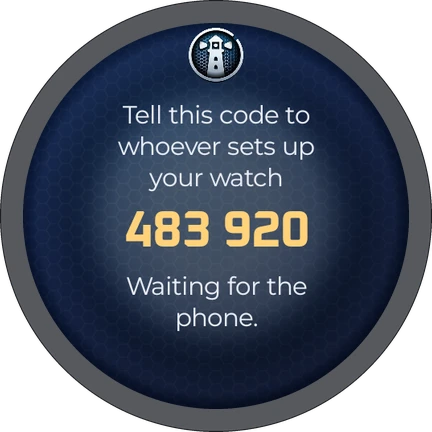
Open Lanturne on the watch. It shows a six-digit code and reads it out loud. On your phone, type that code in and tap Pair watch.
That's all the connecting there is. From now on the watch and your phone never need to be near each other. You can be in another state or another country.
If the code runs out before you type it, the watch simply shows a new one.
4Say yes to everything the watch asks
Right after it connects, the watch asks for a few permissions, one after the other. Tap Allow every time. When you're offered "Allow all the time", pick that one. Here's what each one is for:
- The Lanturne watch face. This puts Lanturne on the watch face itself, with HELP always at the bottom.
- Heart rate. The watch checks the pulse now and then. That's how Lanturne knows the watch is actually being worn.
- Notifications. This is how the daily check-in and your questions reach the watch.
- Physical activity. This lets the watch tell Lanturne about a fall.
- Location. A screen explains this one first. Tap Continue, then Allow. When the watch asks again, choose Allow all the time, then press the back button. With this, an alert about a fall or a HELP press shows you where the watch is.
- Battery. This keeps the watch reporting through the night.
5Check that the Lanturne face is on the watch
You should now see the Lanturne face: a lighthouse on the left, the time on the right and a big orange HELP across the bottom.
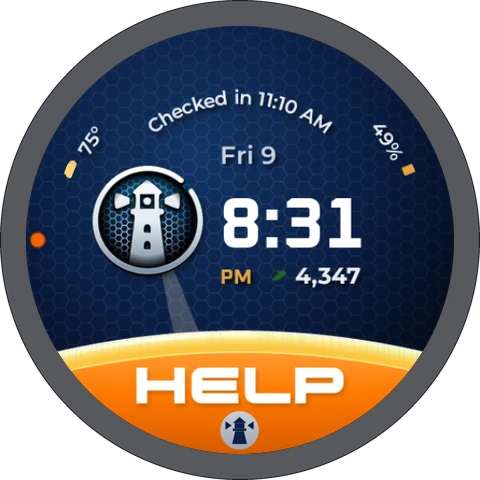
If you see the old face instead, touch and hold the watch face, swipe until you see "Lanturne face", and tap it. On older watches the Lanturne face isn't offered. Everything else still works the same.
6Keep the watch on Sound
Swipe down from the top of the watch face and look at the sound setting. Keep it on Sound, not on Mute. On Mute the watch doesn't buzz and doesn't show the check-in on the screen, so it's easy to miss.
7Pick the time for the daily check-in
In the Lanturne app on your phone, open Settings and choose Daily check-in. Pick a time that suits the person's day. Until you change it, it's 9:00 AM.
What the person wearing the watch does
This part is written to the person wearing the watch. You might print it out and leave it by the charger.
When you need help: tap the orange HELP at the bottom of the watch face. Then press and hold the big orange button for 3 seconds. The watch buzzes, counts down from 5 and then tells your Lanturne. If you pressed it by mistake, tap Cancel during the countdown.

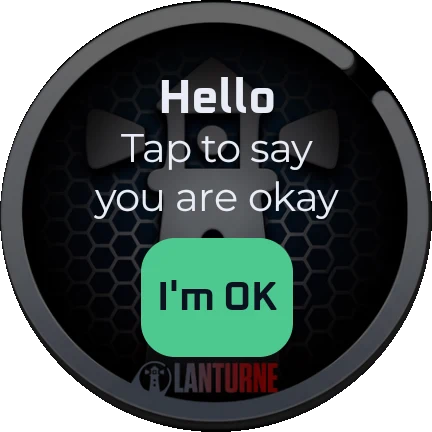
Once a day, at the time that was picked, the watch buzzes and says "Time to check in." Tap I'm OK. That's it for the day.
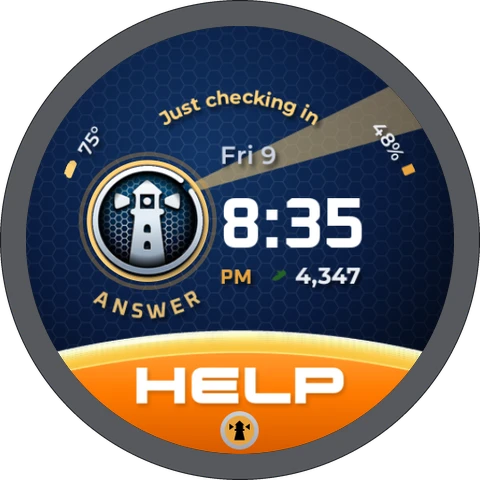
Sometimes your Lanturne asks "Just checking in, hope all is well." Tap I am well, or I am not well if you'd like someone to check on you.
If you miss a question, the lighthouse on your watch face turns gold. Tap the lighthouse and the question comes back.
Wear the watch during the day, charge it at night, and keep it on Sound.
What you get on your phone
Here's every alert you can get, and what happens when one comes in.
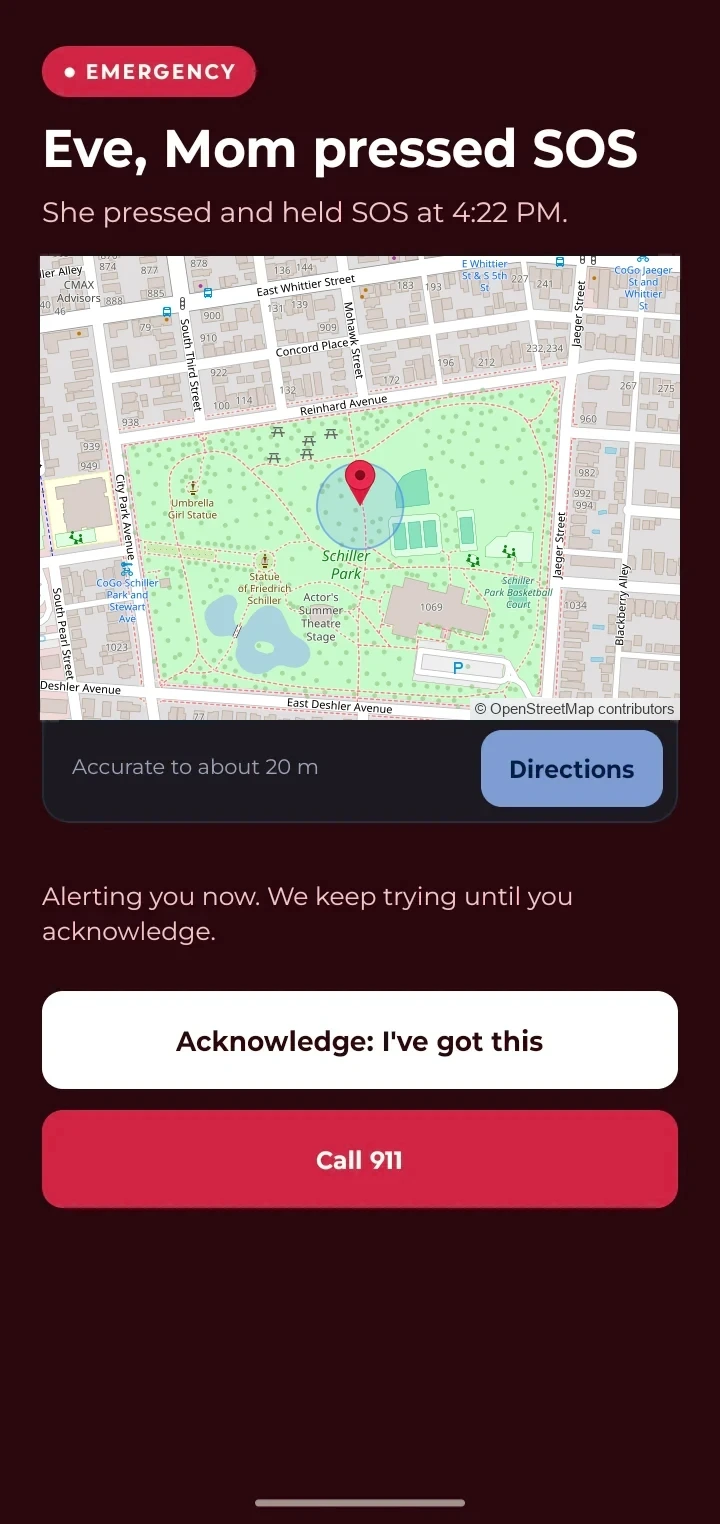
Asking "Just checking in"
Any time during the day, go to the Checking in tab and tap Just checking in. The watch asks within 15 minutes, and the answer shows up on your phone. Nothing happens if nobody answers.
You can ask as often as you like, one question at a time. Lanturne doesn't ask between 9 PM and 8 AM where the watch is, so nobody gets woken up.
Checking that it all works
About half an hour after you finish, open Lanturne on your phone and go to the Status tab.
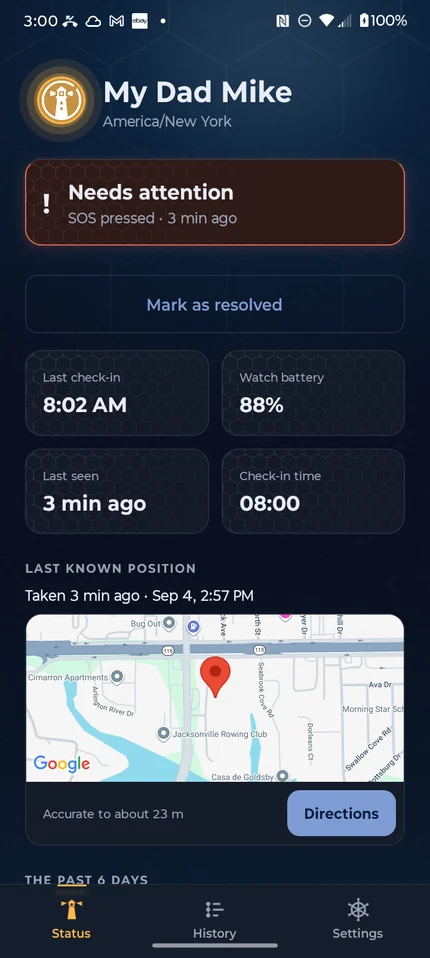
- Last seen shows how recently the watch reported, for example "just now" or "10 min ago".
- If something on the watch needs changing, you see a message headed "One thing needs attention on the watch". It says what to change. If there's no message, you're done.
- If Last seen still says "Never" after an hour, check the watch. It needs Wi-Fi, a cellular signal, or to be near the phone it was set up with.
If a setting turns off later
Now and then, the Status tab may tell you something needs attention on the watch. That isn't an alert, and nothing has happened to the person you look after. Fix it the next time you're with the watch.
One thing needs attention on the watch
Notifications are off. The daily check-in is not shown at all.
Settings → Apps → App list → Lanturne → Notifications → Allow
Battery, or the app being paused
- Pause app activity if unused: turn it off for Lanturne on the watch. Then open Lanturne.
- Lanturne was put to sleep: on the phone the watch was set up with, open the Galaxy Wearable app and go to Watch settings, then Battery, then Background usage limits, then Never sleeping apps, and add Lanturne.
- Battery is restricted: on the watch, go to Settings, then Apps, then App list, then Lanturne, then Battery, and choose Unrestricted.
The check-in
- Notifications are off: on the watch, go to Settings, then Apps, then App list, then Lanturne, then Notifications, and choose Allow.
- The check-in doesn't show on the screen: the watch is on Mute. Swipe down from the top of the watch face and set the sound to Sound.
- The question only shows up as a notification: that's normal on most watches. Tap it, or tap the lighthouse on the Lanturne face, and answer.
Falls
- Not allowed: on the watch, go to Settings, then Apps, then App list, then Lanturne, then Permissions, then Physical activity, and choose Allow.
- Not running: open Lanturne on the watch.
Pulse
- Not allowed, or only while the app is open: open Lanturne on the watch, then choose Allow all the time.
- Not being sent: open Lanturne on the watch. If the message doesn't go away, write to us.
Location
- Location is off: on the watch, go to Settings, then Location, and turn it on.
- Not allowed, or not all the time: on the watch, go to Settings, then Apps, then App list, then Lanturne, then Permissions, then Location, and choose Allow all the time.
Questions? Use the contact form at lanturne.com/contact. A person reads every message.