
Best smartwatch for seniors and the elderly
Looking for the best smartwatch for seniors and the elderly? Families usually weigh up four kinds, so here they are side by side. We pick the Samsung Galaxy Watch. It can be a good watch for an older person because it looks like any other watch and shows the time in big numbers. Fall detection is built in too. On its own, though, it has no daily check-in that shows up on your phone once a day, and that's the part Lanturne adds.
The watches compared
| Watch | What it is | With Lanturne |
| Samsung Galaxy Watch | Works with an Android phone. Fall detection is built in on the Galaxy Watch4 and newer, once it's turned on. From $89 refurbished. | A daily check-in on your phone, and an alert to you when nothing happens, not just when they fall |
| Google Pixel Watch | Works with an Android phone. Fall detection is built in. Check the current price. | The same as on the Galaxy Watch |
| Apple Watch | Only works with an iPhone. Fall detection is built in. | Lanturne doesn't run on it |
| A medical alert service's watch | A monthly plan plus equipment. A monitoring center answers, then usually the family. Fall detection only on models that include it, and a daily check-in is rare. | Not needed: the service answers its own alerts |
Lanturne is $30 a month or $120 a year, and the watch isn't included. What a medical alert service costs, side by side
When another watch suits better
- There's already a Pixel Watch in the family. It works with Lanturne the same way. Every watch Lanturne works on
- Everyone uses an iPhone. Then it's an Apple Watch. Lanturne needs an Android phone, so it won't fit.
- Nobody in the family can respond to an alert. A medical alert service with a monitoring center is worth paying for, and you should have one.
Which Galaxy Watch to get
We suggest the Galaxy Watch 7. It's the watch we build and test Lanturne on every day.
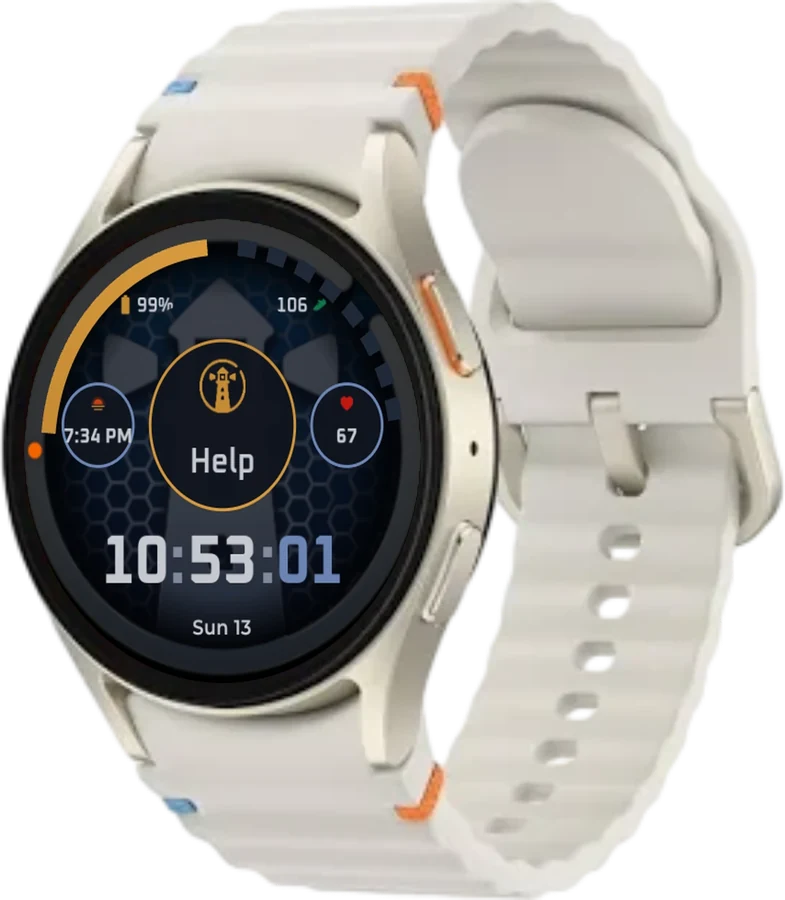
- Get the larger size. The 44 mm watch has a bigger screen, so the time is easier to read and the HELP button is easier to find.
- Refurbished is fine. Refurbished Galaxy watches start at $89.
- LTE lets it work away from home. A Galaxy Watch 7 with LTE costs $139 refurbished. With its own mobile plan, the watch stays connected without the phone nearby.
- An older Galaxy Watch works too. Any Galaxy Watch4 or newer runs Wear OS, and so does the Pixel Watch. The full list of watches
Do Android watches have fall detection?
Many do. The Galaxy Watch and the Pixel Watch both have fall detection built in, and Lanturne uses the watch's own fall detection. When the watch detects a fall and nobody cancels it on the watch, your phone gets an alert. Here's which watches have fall detection, and how to turn it on.
A fall is only one way things go wrong, though. Someone can feel faint and sit down, or not get out of bed, and since there was no fall, no fall alert comes. That's why Lanturne also sends you an alert when something that should happen doesn't, like the daily check-in.
What Lanturne adds to the watch
Here's every alert Lanturne adds, and what happens when one comes in.

Getting started
- Install Lanturne on your Android phone from the Play Store, and start the free 7-day trial.
- On the watch, open the Play Store and install Lanturne. It's the same app, so there's nothing more to pay.
- Open Lanturne on the watch, and type the six-digit code it shows into your phone.
- Tap Allow for everything the watch asks, then pick a time for the daily check-in on your phone.